
At LACE IT TEK Solutions we offer a NO-COST, NO-OBLIGATION DENTAL TECHNOLOGY SYSTEMS REVIEW
Windows 10 End of Life FAQ
to determine what options and issues exist to remain updated and compliant.
Is our dental practice required to upgrade all of our computers to Windows 11?
Yes. Any healthcare practice that electronically stores Protected Health Information (PHI) is required to remain fully compliant with all HIPAA regulations, as defined by the U.S. Department of Health and Human Services (DHHS).
When a patient completes and signs a HIPAA consent form, they are granting permission to share their PHI with your practice, and in return, you—as the practice owner or administrator—are legally obligated to safeguard that information.
Once Microsoft retires support for Windows 10, any computer or device still running this operating system will no longer receive security updates, making it inherently insecure for handling PHI. As a result, even a single non-compliant device within your practice could render your entire organization non-compliant with HIPAA, putting you at risk of legal and financial penalties.
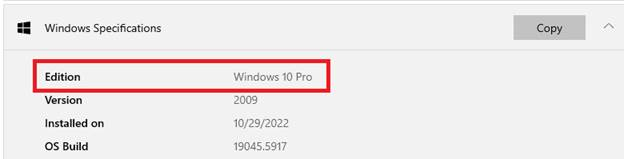
How to identify what version of Windows software is installed?
Click on the START FLAG, type SETTINGS and click on ABOUT and the operating system information is listed in the Windows Specifications section .
Can any Windows 10 Computers be upgraded to Windows 11?
Some. Newer computers had the Windows 11 upgrade automatically installed over the past year. Some older computers may qualify for a manual upgrade.
Microsoft set a minimum requirement of any INTEL 8TH GENERATION PROCESSOR that automatically qualifies for the upgrade but we have also had some success in manually upgrading some 6th and 7th Generation processors.
How to determine if Windows 10 Computer can be upgraded to Windows 11?
To determine if a computer can upgraded to Windows 11 you must:
- Confirm the computer has a qualifying processor (some Intel 6th Generation and 7th Generation processors qualify), AND
- Confirm the computer has TPM (Trusted Platform Module) ver 1.2 (or newer)
In the SETTINGS / SYSTEM / ABOUT page locate the processor type (see below):
Will Our Computers continue to work after October 14th, 2025?
Yes, but will increasingly be more susceptible to cyber-attacks once the computers are no longer receiving critical security updates.
Are there other Concerns besides HIPPA compliance Requirements?
Yes, and in some senses may be more significant. Most insurance companies WILL NOT cover a claim made to either General Business Liability, Business Interruption or Cyber Rider / Policies for outdated / retired systems.
What cost and or life expectations should be considered before manually to Windows 11?
Computers with 6th or 7th Generation processes (that typically will be between 5 to 8 years or older) that can be upgraded should be given careful consideration before investing in these upgrades. Considering the typical life of a business computer is approx 5 years in service upgrading an older computer would be equivalent to a major repair (engine or transmission) in a car with 150,000 or more miles. In some cases it would be a wise decision and yield a favorable return and in other instances; because of the age of the computer and other factors, could be problematic.
Will our current versions of our practice management, X-ray imaging and or CBCT systems on new computers with windows 11?
Maybe. Before committing to a technology refresh plan we routinely inventory all application and imaging software systems to determine if any require an upgrade and the path / cost to upgrading. Dentrix recently announced they will no longer support version 23 (or older) and many x-ray imaging and / or CBCT systems have strict and individual requirements.
Protect Your Practice from Windows 10 End-of-Life Risks
Microsoft ends Windows 10 support on October 14, 2025.
Without security updates, your systems face:
- Cyber Threats: Unpatched vulnerabilities expose patient data.
- HIPAA Risks: Non-compliance could lead to fines.
- Downtime: Outdated tech disrupts your practice.
Special Offer: Receive a FREE Technology System Review.plane
Ready to Get Started?
It’s time to take action and ensure your Practice is prepared for all the issues you may face in technology. We’re here to be your premier partner and handle all your necessary needs.
Reach out today and let’s build you a secure future.

LACE Tek IT Solutis
an Division of Rukrackled, LLC